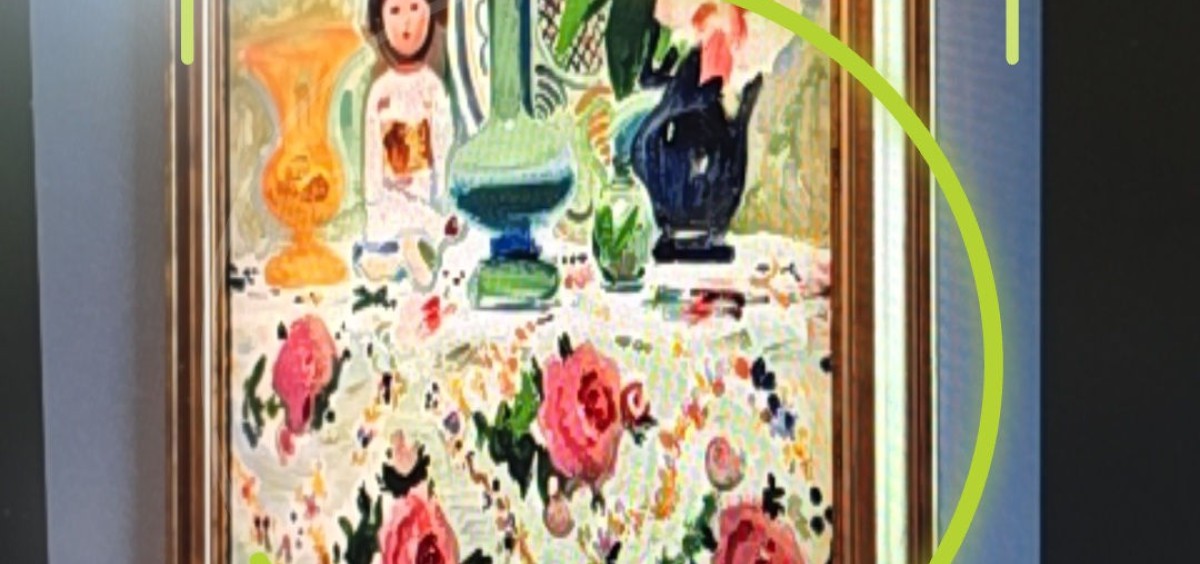
Scan To Play: recognise an exhibit with your camera — content without a label beside the artwork
Not every exhibit can be labelled. Beside a painting, a sculpture or in a carefully designed display, an extra label with a number or a QR code can disrupt how the work is perceived — and conservation rules sometimes rule out placing anything next to the object at all. That is a real problem for the institution, not the visitor.
That is why we introduced Scan To Play in the dedicated AppAudioGuide apps — camera-based exhibit recognition. The visitor points their phone at an object and the app recognises it and opens the linked content — audio, a description or a sign-language video. No code, no number, no intrusion into the exhibition space.
The feature is already in production — the first museum to offer it to visitors is the Silesian Museum in Katowice.
Primarily a dedicated-app feature. Image recognition is part of the dedicated mobile apps under an institution’s brand. It can also be enabled in a slot in the shared AppAudioGuide app — as a paid add-on.
Why it solves a real problem
A QR code or a number has to go somewhere — on a wall, on the floor, on a caption nearby. In many settings that is fine. But there are exhibitions where every extra element in view is a compromise: an art gallery, a historic interior, a minimalist arrangement, an object displayed without a case. Curators and conservators are then forced to choose between access to content and a clean display.
Image recognition removes that trade-off. Content is available at every object, and nothing extra appears beside the exhibit itself. The exhibition stays exactly as it was designed. It also removes the cost of producing and replacing labels or markers beside exhibits.
Easier for the visitor too
The benefit runs both ways. Pointing the camera at an object is a natural gesture — simpler than looking up a number in the app or aiming at a small QR code. A visitor who does not want to hunt for anything still reaches the prepared content, instead of passing the exhibit without context.
How it works
The visitor makes three simple moves:
- Opens the scanner in the app.
- Points the camera at the exhibit — a painting, a sculpture, a machine, any object.
- The app opens the content in the chosen mode: to listen, read or watch.
All recognition runs locally, on the visitor’s phone — nothing is sent to a server and no internet connection is required. In rooms with thick walls, where the signal is weak or absent, scanning works where the network does not reach.
Accessibility at the centre
Once an exhibit is recognised, the visitor can open not only an audio recording and a text description but also a video in Polish Sign Language. For d/Deaf visitors this means access to the exhibition in their natural language.
The feature also respects the other accessibility requirements: reduced motion for people sensitive to movement, labels for screen readers and conformance with the WCAG guidelines.
Visitor privacy
With a feature that uses the camera, the question of privacy comes up naturally, so we answer it plainly: camera photos never leave the phone. Recognition happens on the device, the model runs locally, and nothing reaches a server.
Honest about what it can do
Image recognition is a specific, trained mechanism prepared for a given collection — not an “AI that knows everything”. Its accuracy depends on the reference material for the particular exhibition.
When the display contains objects that look strikingly alike — for example a series of paintings by the same artist — the app does not guess. Instead it offers a short list and lets the visitor pick the right exhibit. This is deliberate: better to offer a choice than to open the wrong content.
Part of the dedicated app
Exhibit recognition is one of the reasons institutions choose a dedicated app under their own brand rather than a slot in the shared one. It is the option for museums that want full control over the visitor experience — their own presence in the App Store and Google Play, their own set of features, and capabilities such as image recognition.
The feature can also be enabled in a slot in the shared AppAudioGuide app as a paid add-on. In a dedicated deployment, its scope and cost are agreed individually.
If you would like to see how the feature could work in your exhibition, get in touch.
AppAudioGuide — mobile audio guides and a content management system for cultural institutions. Deployments include the Silesian Museum and the National Museums in Krakow and Gdansk.
Share: