An audio guide for museums, in the phone browser
A guide to your exhibition with no app to download. A form, descriptions, photographs — and a ready address with a QR code. Visitors scan and listen, with nothing to install and no account to create.
No implementation contract, no waiting for app store review.
A guide ready in an hour
The texts usually exist already: descriptions from the exhibition catalogue, notes used by guides, photographs from the records. That is quite enough — the guide can launch on descriptions alone, and a tour with a dozen or so stops comes together in under an hour.
Recordings can come later — made in-house or commissioned from us. The guide is built by someone who knows the collection: a curator, a guide, an educator. A temporary exhibition can have its guide from day one rather than halfway through, and a correction to a description goes live at once.
Three steps to a finished guide
With descriptions and photographs ready, the first tour takes an hour to assemble; recordings and further stops can be added at your own pace.
Fill in the form
The venue name, a logo, two colours from your visual identity. The panel checks text legibility by itself — no expertise required.
Add the stops
Each stop is a description, a photograph and — once it exists — a recording. You may begin with the five key exhibits and add the rest later.
Put up the QR code
The address and a ready-to-print code appear straight away. From then on, visitors scan and listen.
What a browser audio guide includes
No developer, no agency
Nothing to commission or order. The guide is built in a browser, in a panel that works like an ordinary form.
No prompts, no AI surcharges
No prompts to write and no separate charge for model usage. Artificial intelligence plays two roles here: translating descriptions into further languages and suggesting alternative text for images. It does not write the guide — that stays yours.
Works without a signal
Visitors download the guide once, at the entrance, and listen in rooms with thick walls or outdoors with no network. It is a PWA guide — the content stays in the phone.
QR codes at the exhibits
Scanning a plaque starts the right recording immediately, with no hunting through a list. The same address can be written to an NFC tag.
Changes take effect at once
A corrected description is visible at once. No new build to upload to the stores, no review to wait for.
A map of the place
Stops on a plan of the grounds or the building, with the route. The map works with no signal, just like the rest of the guide.
The accessibility the law requires
Public institutions are required to ensure digital accessibility. The guide offers a high-contrast mode, text enlargement, screen-reader support and transcripts. Colour contrast is checked automatically — if the chosen colours fail the standard, publishing stays blocked until they are corrected.
The Guide plan also includes sign-language video tracks and audio description. These are not paid extras — they are in the panel from day one.
Not only for museums
Small and mid-sized venues
Open-air museums, regional museums, memorial rooms, churches, castles. One tour, a dozen or so stops, your own address.
Trails and open spaces
Nature trails, parks, gardens, city routes. Stops on a map with a recording at each one.
Private collections
A collection, a farm, a vineyard, a workshop. You do not have to be an institution to show people around.
Tyniec Benedictine Abbey
A guide to the abbey, in Polish and English. Open it on your phone to see exactly what a visitor sees: the welcome screen, stops with recordings and transcripts. Once the content is downloaded, it works with no signal.
Open the guide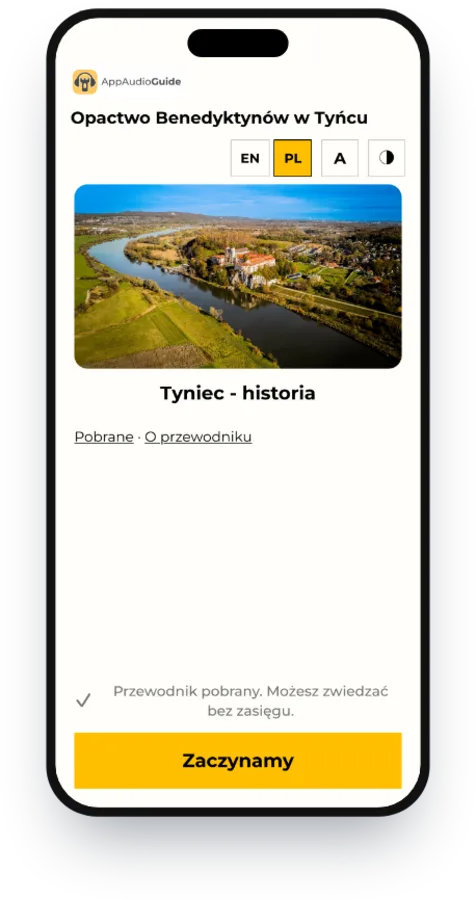
One exhibition, one price
A small guide in the browser
Free of charge
For a single room, a chapel or a short trail outdoors.
- 1 exhibition, up to 10 stops
- 1 language
- Audio recordings
- Map, QR codes, offline mode
- WCAG 2.1 AA compliance
A guide in the browser
EUR 690 net / year
or EUR 139 net per month for a temporary exhibition
One exhibition with no limits on content — as many stops, languages and recordings as needed.
- 1 exhibition, unlimited stops
- Unlimited languages
- Audio, video and sign-language video
- Map, QR codes, offline mode
- WCAG 2.1 AA compliance
- Playback statistics
Presence in the AppAudioGuide app
EUR 690 net / year
can be added at any time
The same content also goes into the AppAudioGuide app. A visitor who already has it from another museum opens your guide with one tap — no code to scan, no browser.
- Presence in the App Store and Google Play
- New visitors who find you while browsing the app
- Content managed in one place, in the same panel
Dedicated app
Implementation and ongoing care
quoted after we talk about your needs
Your own app under the institution's brand, in the App Store and Google Play. This is not a pricier version of the browser guide but a different product — designed for one institution and run by us throughout the engagement.
- A dedicated project lead — one person who knows your project
- An app designed around your brand and the way people visit
- Camera-based exhibit recognition, with no QR codes beside the object
- News, events and notifications for visitors
- Integrations with ticketing and booking systems
- Publishing, upkeep and updates in both stores handled by us
No time to enter the content? We will enter it for you — EUR 229 net, once, when the guide is set up. Send the recordings, photographs and descriptions, and the guide will be ready at your own address.
Need the recordings made? We will produce them from your texts — the quote depends on the number of stops and languages. The guide can run on descriptions alone and have the recordings added later.
A larger institution? Several exhibitions or trails, branches in different places — get in touch and we will prepare a quote that fits your scale.
What is worth knowing
Does the visitor have to install anything?
No. The guide opens in the phone browser like an ordinary web page. To use it without a signal, the visitor downloads the content with one button — recordings and images are stored in the browser. It can also be added to the home screen, where it looks and opens like an app, but that is the visitor's choice, not a requirement.
Is this a PWA?
Yes. The guide runs as a PWA (Progressive Web App) — hence no installation, offline use once the content is downloaded, the option to add it to the home screen, and instant updates without going through the app stores.
How long does it take to prepare a guide?
With the descriptions ready — about an hour for a tour with a dozen or so stops. The guide works on text alone, so there is no need to wait for recordings before launching; they can be added at any time.
Can the guide be in several languages?
Yes. You choose the languages and complete the recording and description for each stop in each of them. The visitor picks a language on entry.
Do we need a separate app in the stores?
It depends on what it is meant to do. A guide in the browser is enough when visitors come once and scan a code at the entrance. An app under the institution's own brand makes sense for returning visitors, notifications, camera-based exhibit recognition and building recognition in the stores. The middle path is adding your guide to the AppAudioGuide app. In every variant the same content feeds them all — you never prepare it twice, and moving from one to another does not mean starting over.
What about visitors' data?
The guide creates no accounts and asks for no personal data. It collects anonymous statistics — how often it was opened and which stops people listen to — under a random identifier, with no IP address. Settings and downloaded files stay on the visitor's device.
Create an account and add your first stop
The panel guides you step by step — from the name of the place to a QR code ready to go on the wall.
Start for freeQuestions before you create an account? Get in touch